Async Python: asyncio Explained for Beginners
SkillVeris Team
Engineering Team
Async Python is about concurrency, not parallelism: while one operation waits, the event loop runs another.
In this guide, you'll learn:
- Use async def to declare a coroutine, await to pause it, gather to run many concurrently, and asyncio.run as the entry point.
- It is most valuable for I/O-bound work like HTTP calls, database queries, and file operations.
- asyncio.gather runs coroutines concurrently while asyncio.create_task schedules them in the background.
- httpx is the modern async HTTP client and FastAPI runs async route handlers natively.
1Why Async Python Exists
When a Python program makes an HTTP request or queries a database, it spends most of its time waiting rather than computing. Standard synchronous Python blocks the entire thread during that wait, so if 100 users make simultaneous requests, each effectively waits for the previous one to finish. This doesn't scale.
Async Python solves this with cooperative multitasking: when one operation is waiting for I/O, the event loop switches to another operation that is ready to run. One thread handles hundreds of concurrent operations by never sitting idle.
2Sync vs Async vs Threads vs Processes
Choosing the right concurrency model comes down to what your code is waiting on. The most common mistake is using threads for async I/O or async for CPU-bound work; match the model to the bottleneck.
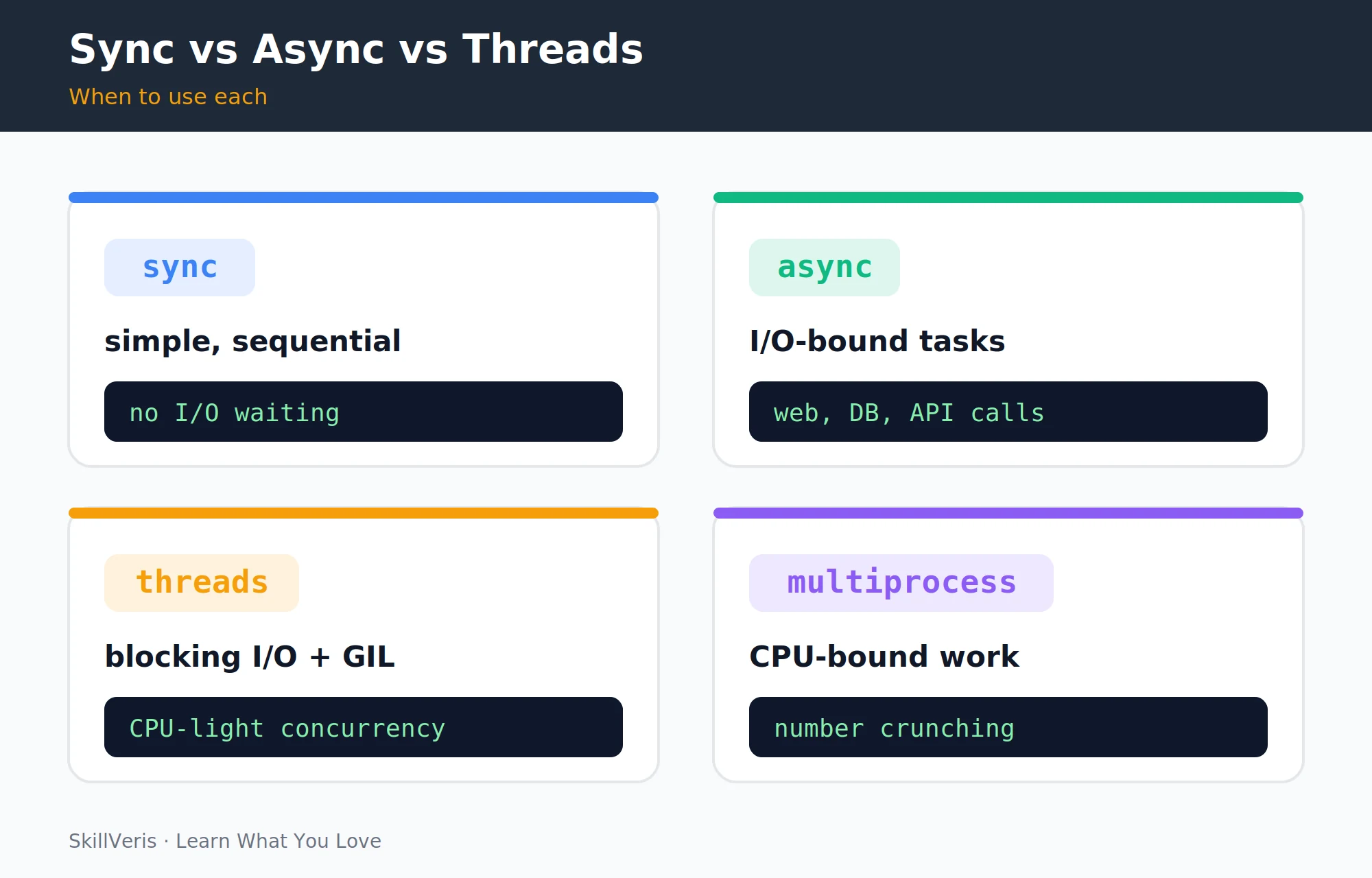
- Synchronous · best for simple scripts and CPU work with no waiting · regular Python.
- Async (asyncio) · best for many concurrent I/O operations such as web, DB, and APIs · asyncio, httpx, FastAPI.
- Threading · best for blocking I/O and legacy libraries without async support · threading, concurrent.futures.
- Multiprocessing · best for CPU-bound work such as image processing and number crunching · multiprocessing, ProcessPoolExecutor.
3The Event Loop
The event loop is asyncio's central scheduler. It maintains a queue of coroutines, runs each one until it hits an await, pauses it, switches to another ready coroutine, and comes back when the awaited operation completes.
From the outside, multiple operations appear to run simultaneously; internally, they run on a single thread, interleaved. Two tasks that sleep for different durations finish in the time of the longest one, not the sum of both.
Interleaving two tasks
Both tasks share one thread and total ~1 second rather than 1.5.
import asyncio
async def task_one():
    print("Task 1 starts")
    await asyncio.sleep(1)  # yields control to event loop
    print("Task 1 finishes")
async def task_two():
    print("Task 2 starts")
    await asyncio.sleep(0.5)
    print("Task 2 finishes")
async def main():
    await asyncio.gather(task_one(), task_two())
asyncio.run(main())
# Task 1 starts -> Task 2 starts -> Task 2 finishes -> Task 1 finishes
# Total time: ~1 second (not 1.5)4Coroutines: async def and await
A regular function runs synchronously, while a coroutine declared with async def can be suspended at its await points. Calling a coroutine function returns a coroutine object and does not run the code yet.
You can only use await inside an async def function, and coroutines aren't scheduled automatically; you must either await them or wrap them in a Task.
Sync vs coroutine
The async version suspends at the network call instead of blocking.
# Regular function: runs synchronously
def fetch_sync(url: str) -> str:
    import requests
    return requests.get(url).text
# Coroutine: can be suspended at await points
async def fetch_async(url: str) -> str:
    import httpx
    async with httpx.AsyncClient() as client:
        response = await client.get(url)
        return response.text
Key rules
The four rules that govern coroutines and await.
async def creates a coroutine function; calling it returns a coroutine object and doesn't run the code yet.
await suspends the current coroutine and gives control back to the event loop until the awaited object is ready.
You can only await inside an async def function.
Coroutines are not automatically scheduled; you must either await them or wrap them in a Task.5asyncio.run(): The Entry Point
asyncio.run() creates a new event loop, runs the coroutine to completion, and closes the loop. Use it as the single entry point at the top level of your program.
Never call asyncio.run() inside an already-running event loop, such as inside FastAPI endpoints or Jupyter notebooks.
💡Pro Tip
In Jupyter notebooks, the event loop is already running. Use await main() directly instead of asyncio.run(main()), or install nest_asyncio and call nest_asyncio.apply() at the top of your notebook.
The correct entry point
Run a top-level coroutine with a single asyncio.run() call.
async def main():
    print("Hello from async")
    await asyncio.sleep(0)
    print("Done")
# The correct way to run an async program
asyncio.run(main())6Running Tasks Concurrently: gather
asyncio.gather() schedules all the coroutines you pass it simultaneously and waits for all of them to complete. Three requests that each take a second run in about one second together, instead of the three seconds a sequence of awaits would take.
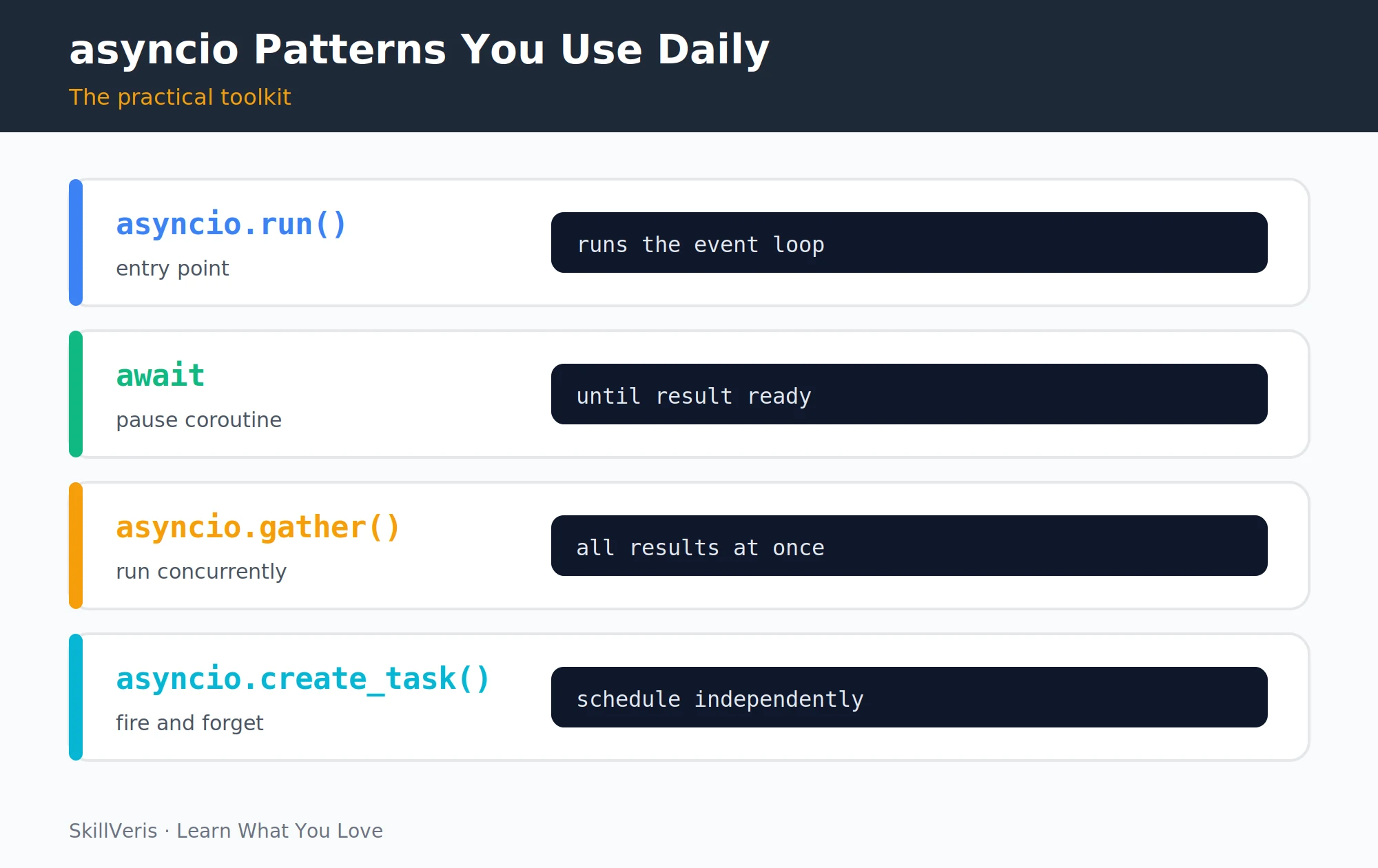
These four patterns, run, await, gather, and create_task, cover roughly 90% of real-world async Python.
Concurrent HTTP requests
gather fires all three fetches at once and collects the results.
import asyncio, httpx, time
async def fetch(client: httpx.AsyncClient, url: str) -> int:
    r = await client.get(url)
    return r.status_code
async def main():
    urls = [
        "https://httpbin.org/delay/1",
        "https://httpbin.org/delay/1",
        "https://httpbin.org/delay/1",
    ]
    start = time.perf_counter()
    async with httpx.AsyncClient() as client:
        # All three requests run concurrently
        results = await asyncio.gather(*[fetch(client, u) for u in urls])
    elapsed = time.perf_counter() - start
    print(f"Status codes: {results}")
    print(f"Time: {elapsed:.1f}s")  # ~1s, not ~3s
asyncio.run(main())7asyncio.create_task(): Fire and Forget
Use create_task() when you want a coroutine to run in the background without blocking the current flow. The main coroutine continues immediately and can later await the task to ensure it finishes.
Always store the task in a variable or a set to prevent it from being garbage-collected before completion.
Scheduling a background job
Kick off work, keep going, then await it before exiting.
async def background_job(name: str):
    await asyncio.sleep(2)
    print(f"{name} done")
async def main():
    # Schedule task without waiting for it immediately
    task = asyncio.create_task(background_job("analytics"))
    print("Main continues while task runs...")
    await asyncio.sleep(1)
    print("Still working...")
await task # wait for task to complete before exiting8Async Context Managers and Iterators
Async context managers (async with) and async iterators (async for) work exactly like their synchronous counterparts but yield control to the event loop at their suspension points. They appear throughout async code, from HTTP clients to database sessions.
Async iteration is especially useful for streaming responses, such as printing an LLM's output chunk by chunk as it arrives.
async with and async for
Patterns for clients, database sessions, and streaming.
# Async context manager (async with)
async with httpx.AsyncClient() as client:
    r = await client.get("https://api.example.com")
# Async database session (SQLAlchemy async)
async with AsyncSession(engine) as session:
    result = await session.execute(select(User))
# Async iterator (async for) - e.g. streaming LLM response
async with client.stream("POST", url, json=payload) as stream:
    async for chunk in stream.aiter_text():
print(chunk, end="", flush=True)9Real-World: Async HTTP with httpx
httpx is the modern async HTTP client for Python and serves as a drop-in async replacement for requests. It supports timeouts, query parameters, and raise_for_status just like the synchronous client.
A typical pattern opens an AsyncClient, awaits the request, and returns the parsed JSON, all inside a coroutine driven by asyncio.run().
Fetching GitHub repos
An async client call wrapped in a coroutine.
import asyncio
import httpx
async def fetch_github_repos(username: str) -> list:
    async with httpx.AsyncClient(timeout=10.0) as client:
        r = await client.get(
            f"https://api.github.com/users/{username}/repos",
            params={"per_page": 10, "sort": "updated"}
        )
        r.raise_for_status()
        return [repo["name"] for repo in r.json()]
async def main():
    repos = await fetch_github_repos("anthropics")
    print(repos)
asyncio.run(main())10Async in FastAPI
FastAPI is built on asyncio and runs async route handlers natively, and you can mix sync and async handlers in the same app. Mark a route async def when its handler makes async I/O calls.
FastAPI runs plain def handlers in a thread pool executor automatically, so synchronous libraries don't block the event loop.
Mixing async and sync routes
Async for I/O-bound work, plain def for synchronous code.
from fastapi import FastAPI
import httpx
app = FastAPI()
# Async route: best for I/O-bound operations
@app.get("/weather/{city}")
async def get_weather(city: str):
    async with httpx.AsyncClient() as client:
        r = await client.get(
            f"https://wttr.in/{city}?format=j1"
        )
    data = r.json()
    return {"city": city, "temp_c": data["current_condition"][0]["temp_C"]}
# Sync route: FastAPI runs in a thread pool automatically
@app.get("/health")
def health_check():
return {"status": "ok"}11Common Mistakes
Most async bugs come from a handful of recurring mistakes, and nearly all of them involve forgetting to await something or accidentally blocking the event loop. Spotting these patterns early saves hours of confusion.
- Calling a coroutine without awaiting it: fetch(url) returns a coroutine object but doesn't run it. Fix: await fetch(url).
- Using blocking calls inside async functions: time.sleep(1) blocks the entire event loop. Fix: use await asyncio.sleep(1) or asyncio.to_thread().
- Using requests inside async code: requests.get() is synchronous and blocks the loop. Fix: use httpx or aiohttp.
- Calling asyncio.run() inside an async function: you're already inside an event loop, so use await instead.
⚠️Watch Out
Any blocking call (synchronous I/O, CPU-heavy computation, or time.sleep) inside an async def blocks the event loop and eliminates the concurrency benefits. Use asyncio.to_thread(blocking_fn, args) to run blocking code in a thread pool without blocking the loop.
12Key Takeaways
Async Python achieves concurrency on a single thread by switching between coroutines at await points, and matching the concurrency model to the bottleneck is the central skill.
- Async Python achieves concurrency on a single thread by switching between coroutines at await points.
- Use async def and await for I/O-bound operations, threads for blocking libraries, and multiprocessing for CPU-bound work.
- asyncio.gather() runs multiple coroutines concurrently; asyncio.create_task() schedules them in the background.
- Never use blocking calls inside async def; use asyncio.to_thread() to offload them.
13What to Learn Next
Put async Python to work in real systems where its benefits are most visible.
- Build a REST API with FastAPI: async in a real production context.
- Python OOP: async methods in classes follow the same patterns.
- AI Agents Explained: agent loops are almost always async.
14Frequently Asked Questions
Is async Python faster than regular Python? For I/O-bound tasks such as network calls, database queries, and file reads, yes, dramatically. For CPU-bound tasks, no, because async doesn't add parallelism for computation; the speedup comes from not wasting time waiting, since the CPU is no faster.
What is the difference between asyncio and threading? Threading gives each concurrent task its own OS thread that can be pre-emptively interrupted, while asyncio uses cooperative multitasking where coroutines voluntarily yield at await points. asyncio is lighter, scales better (thousands of coroutines versus hundreds of threads), and avoids race conditions more easily, whereas threading is useful for blocking legacy libraries that don't support async.
Do I need to rewrite all my code to use async? No. Adopt async incrementally: add it to new I/O-bound endpoints, use asyncio.to_thread() to call synchronous code from async contexts, and leave CPU-bound code synchronous. FastAPI handles the mixing automatically.
What is aiohttp vs httpx? Both are async HTTP clients. httpx is newer, has a more Pythonic API that mirrors requests, and supports both sync and async modes, while aiohttp is older, async-only, and slightly faster at high throughput. For new projects, start with httpx.
Related Reading
Get The Print Version
Download a PDF of this article for offline reading.
About the Publisher
SkillVeris Team
Engineering Team
Our engineering writers turn abstract code concepts into hands-on, project-driven learning experiences.
View all postsRelated Posts
Never miss an update
Get the latest tutorials and guides delivered to your inbox.
No spam. Unsubscribe anytime.