CI/CD Explained: Build, Test, Deploy
SkillVeris Team
Cloud & Security Team
CI/CD automates building, testing, and deploying code so every push triggers a pipeline that releases automatically or with one approval click.
In this guide, you'll learn:
- Smaller, more frequent changes shrink the blast radius when something goes wrong, making releases safer as well as faster.
- Continuous Integration catches integration problems early; Continuous Delivery keeps artifacts production-ready; Continuous Deployment removes the human approval step.
- Every pipeline runs four gated stages: source, build, test, and deploy.
- GitHub Actions is the easiest starting point — free for public repos, YAML-based, and built right into GitHub.
1What Is CI/CD?
CI/CD stands for Continuous Integration and Continuous Delivery (or Deployment). Together they describe a practice where every code change is automatically built, tested, and made ready to ship — often without any manual steps at all.
It transforms deployment from a stressful, infrequent event into a boring, routine process. That's the goal: make releasing so easy and safe that it happens dozens of times a day.
2Why It Matters
CI/CD pays off across the whole release process, from how quickly you learn about bugs to how confidently you ship.
- Faster feedback: bugs are caught within minutes of being introduced, not weeks later.
- Less risk per release: small, frequent changes are far easier to debug than large, infrequent ones.
- No manual toil: no more "who pressed deploy?" — every release is auditable and repeatable.
- Higher confidence: a passing pipeline is proof that the code builds, tests pass, and the artifact is deployable.
🔑Key Takeaway
CI/CD doesn't just speed up development — it makes releases safer. Smaller changes mean smaller blast radius when something goes wrong.
3CI vs CD: The Difference
Three closely related terms are easy to confuse — here's how they differ.
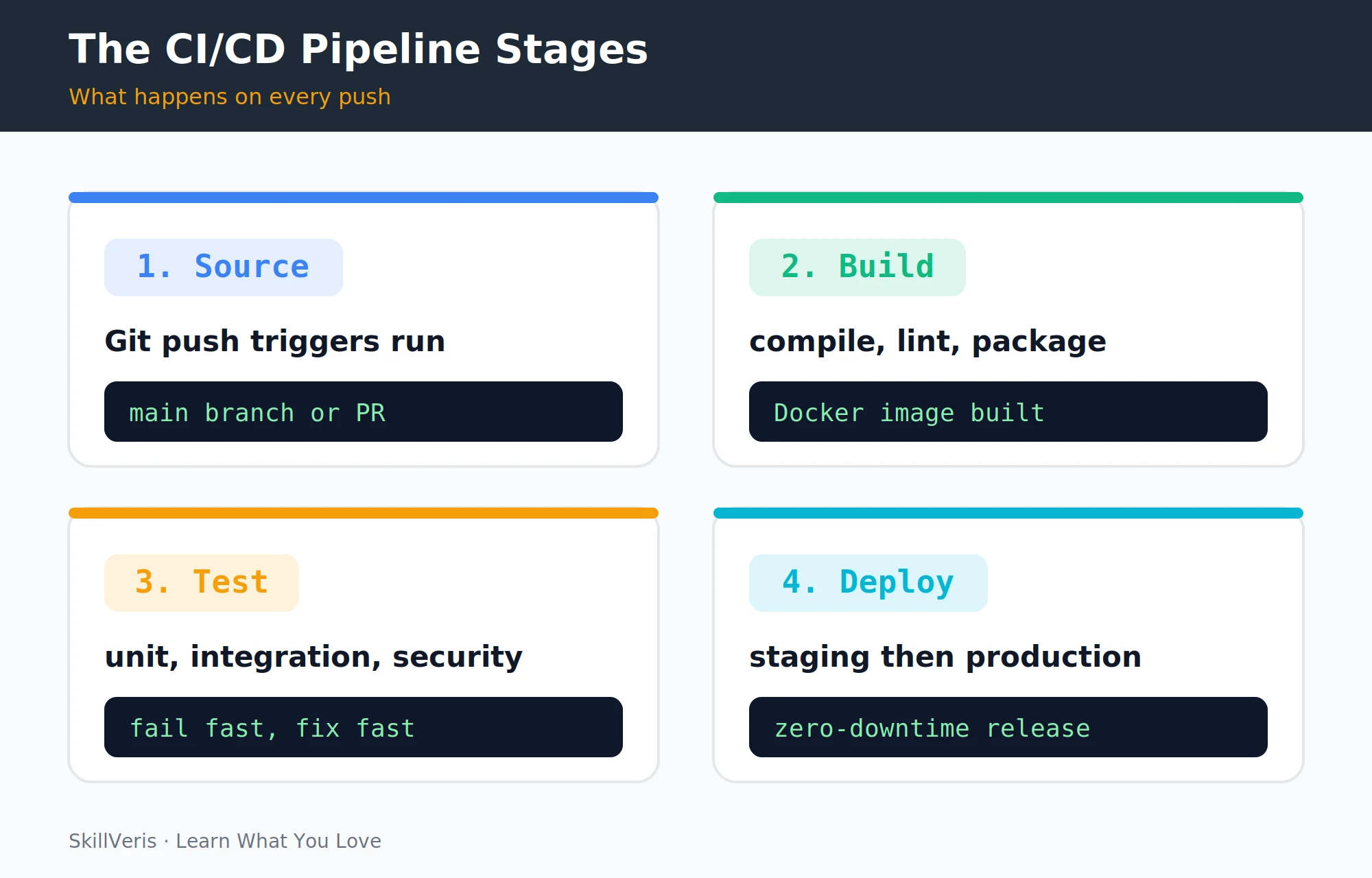
- Continuous Integration (CI): every developer merges code frequently; each merge triggers an automated build and test run. Goal: detect integration problems early.
- Continuous Delivery (CD): the pipeline goes all the way to a staging environment; the artifact is always production-ready. A human decides when to release.
- Continuous Deployment (CD): removes the human approval step — every green build deploys to production automatically. Requires a mature test suite.
Where to Start
Most teams start with CI plus Continuous Delivery. Full Continuous Deployment comes later as trust in the test suite grows.
4Anatomy of a Pipeline
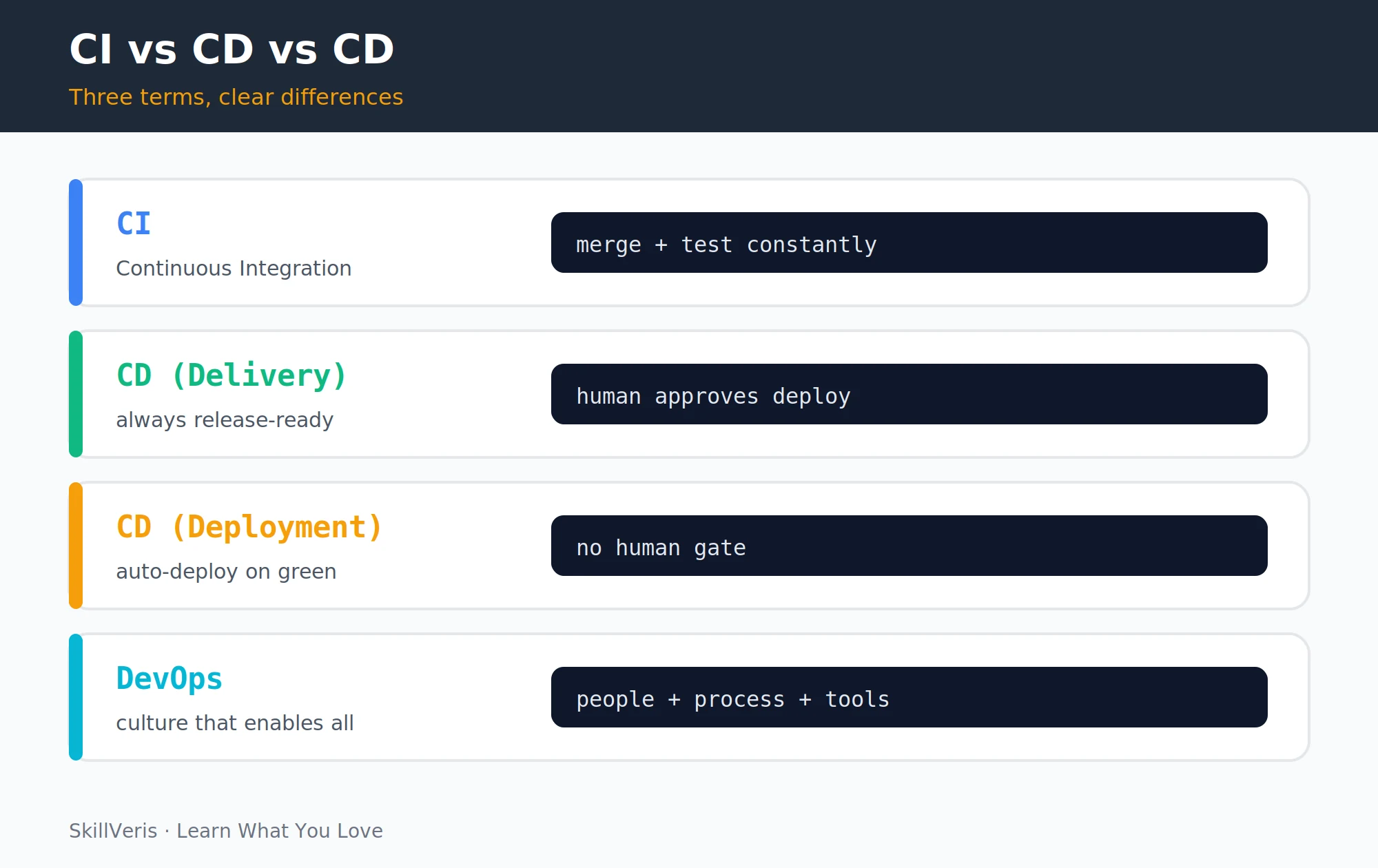
The four stages every pipeline runs on every push form the backbone of CI/CD.
- Source: a Git push or pull request triggers the pipeline.
- Build: code is compiled or packaged (e.g. a Docker image is built and tagged).
- Test: automated tests run — unit tests, integration tests, linting, security scans. A single failure stops the pipeline.
- Deploy: the artifact is pushed to staging; after approval (or automatically), to production.
Why It's Safe
Each stage is a gate: the pipeline only advances if the previous stage passed. This is what makes CI/CD safe.
5Your First GitHub Actions Pipeline
GitHub Actions is the easiest way to start with CI/CD — it's free for public repos, built into GitHub, and uses simple YAML files stored in .github/workflows/.
Commit this file and push — GitHub runs the pipeline on every push and shows a green tick or red cross next to each commit.
ci.yml
A minimal workflow that checks out the code, sets up Python, installs dependencies, and runs tests.
# .github/workflows/ci.yml
name: CI
on:
  push:
    branches: [main]
  pull_request:
    branches: [main]
jobs:
  build-and-test:
    runs-on: ubuntu-latest
    steps:
      - uses: actions/checkout@v4
      - name: Set up Python
        uses: actions/setup-python@v5
        with:
          python-version: '3.12'
      - name: Install dependencies
        run: pip install -r requirements.txt
      - name: Run tests
run: pytest --tb=short6Adding Tests
A pipeline is only as good as its tests. The test pyramid for CI balances speed against coverage.
- Unit tests (most, fastest): test individual functions in isolation.
- Integration tests (fewer): test how components work together (database calls, API endpoints).
- End-to-end tests (fewest, slowest): simulate a real user. Run these less frequently or in parallel.
💡Pro Tip
Fail the pipeline if test coverage drops below a threshold: pytest --cov=app --cov-fail-under=80. It enforces discipline without slowing anyone down.
Lint Before You Test
Add a linting step ahead of the test run, and report coverage alongside results.
# Add linting before tests
- name: Lint with flake8
  run: pip install flake8 && flake8 . --max-line-length=120
- name: Run tests with coverage
run: pytest --cov=app --cov-report=term-missing7Building and Pushing a Docker Image
Add a second job to build a Docker image and push it to Docker Hub or GitHub Container Registry.
Store credentials as GitHub Secrets (repo Settings → Secrets), never in the YAML file.
build-image Job
The needs key ensures this job only runs after tests pass.
build-image:
  needs: build-and-test # only runs if tests pass
  runs-on: ubuntu-latest
  steps:
    - uses: actions/checkout@v4
    - name: Log in to Docker Hub
      uses: docker/login-action@v3
      with:
        username: ${{ secrets.DOCKER_USERNAME }}
        password: ${{ secrets.DOCKER_PASSWORD }}
    - name: Build and push
      uses: docker/build-push-action@v5
      with:
        push: true
tags: myuser/myapp:latest8Deploying Automatically
A simple deployment step uses SSH to reach a cloud server and pull the new image.
The environment: production line adds a required approval gate before the deploy step runs — one click in GitHub's UI.
deploy Job
This job depends on the image build and deploys over SSH.
deploy:
  needs: build-image
  runs-on: ubuntu-latest
  environment: production # requires manual approval
  steps:
    - name: Deploy via SSH
      uses: appleboy/ssh-action@v1
      with:
        host: ${{ secrets.SERVER_IP }}
        username: deploy
        key: ${{ secrets.SSH_KEY }}
        script: |
          docker pull myuser/myapp:latest
docker compose up -d9Pipeline Best Practices
A few habits keep pipelines fast, secure, and trustworthy as your project grows.
- Keep pipelines fast: under 10 minutes for CI; slow pipelines get ignored. Parallelise test suites when needed.
- Cache dependencies: use actions/cache to avoid reinstalling packages on every run.
- Never store secrets in YAML: always use repository secrets or a secrets manager.
- Pin action versions: use actions/checkout@v4 not @main to avoid supply-chain attacks.
- Notify on failure: connect Slack or email alerts so broken builds don't go unnoticed.
10CI/CD Tool Landscape
Several mature tools cover the CI/CD space, each with its own strengths and free-tier limits.
- GitHub Actions · GitHub repos, all languages · Yes (public repos + 2k min/mo)
- GitLab CI/CD · GitLab repos, self-host option · Yes
- Jenkins · Self-hosted, full control · Open source
- CircleCI · Fast builds, Docker-first · Limited free tier
- Bitbucket Pipelines · Atlassian / Jira users · Limited free tier
Where to Begin
Start with GitHub Actions — it requires no external setup and the ecosystem of pre-built Actions covers almost every use case.
11Common Mistakes
A handful of recurring mistakes undermine otherwise solid pipelines.
- Committing secrets to the repo — GitHub's secret scanning will catch it, but the damage is done. Use secrets and .gitignore.
- Skipping tests to speed up the pipeline — this defeats the entire purpose of CI.
- One giant job instead of parallel stages — split build, test, and deploy into separate jobs with needs dependencies.
- No notifications — broken pipelines that nobody notices for hours are worse than no pipeline at all.
⚠️Watch Out
A pipeline with no tests is just an automated deployment script — it ships bugs faster. Always include at least a basic test stage before deploying anything.
12Key Takeaways
The essentials of CI/CD come down to a few durable principles.
- CI/CD automates build, test, and deploy on every code push — making releases routine, not risky.
- The pipeline stages are: source → build → test → deploy. Each is a gate.
- GitHub Actions is the easiest starting point — free, YAML-based, built into GitHub.
- Store secrets in repository secrets; pin action versions; keep pipelines fast.
13What to Learn Next
Extend your CI/CD knowledge with these related topics.
- Docker for Beginners — build the images your pipeline ships.
- Kubernetes for Beginners — the deployment target for production pipelines.
- What Is DevOps? — the culture CI/CD enables.
14Frequently Asked Questions
What is the difference between CI and CD? CI (Continuous Integration) focuses on merging and testing code frequently. CD (Continuous Delivery or Deployment) extends the pipeline to automatically prepare or ship releases. CI is the foundation; CD builds on top of it.
Do I need CI/CD for personal projects? Even a simple GitHub Actions workflow that runs tests on every push is worth it — it catches mistakes before they reach your live site. A basic pipeline takes under 30 minutes to set up.
Is GitHub Actions free? GitHub Actions is free for public repositories with no limits. Private repositories get 2,000 free minutes per month on the free plan; paid plans offer more. Check github.com/pricing for current details.
What's the difference between GitHub Actions and Jenkins? GitHub Actions is managed (no server to maintain), lives in the repo, and integrates seamlessly with GitHub. Jenkins is self-hosted, highly customisable, and better for complex enterprise pipelines or when you need to run agents on your own infrastructure.
Related Reading
Get The Print Version
Download a PDF of this article for offline reading.
About the Publisher
SkillVeris Team
Cloud & Security Team
Our cloud and security experts break down complex infrastructure topics into practical, beginner-friendly guides.
View all postsRelated Posts
Never miss an update
Get the latest tutorials and guides delivered to your inbox.
No spam. Unsubscribe anytime.